

Maestro Video Generation API Integration Guide
Maestro is an Agent-native video production interface: you use a natural language prompt to describe the video you want (optionally attach reference images / videos / audio with file_urls), and a headless "AI director" will automatically complete topic selection, scriptwriting, visual generation, voice-over, background music, compositing, and rendering, ultimately producing a finished video with subtitles and uploading it to the CDN.
This article will introduce the integration guide for the Maestro Video Generation API in detail, helping you quickly integrate and fully utilize the capabilities of this API.
This is an asynchronous task interface: after submission, it will immediately return a task_id, and you can then poll for results through the Maestro Task Query API (POST /maestro/tasks) (polling is free and not billed). To continue iterating on an existing video, you can use action: remix / edit / extend together with ref_task_id.
¶ Application Process
To use the Maestro Video Generation API, first go to the WorldAi Console to obtain your API Token and keep it for later use.
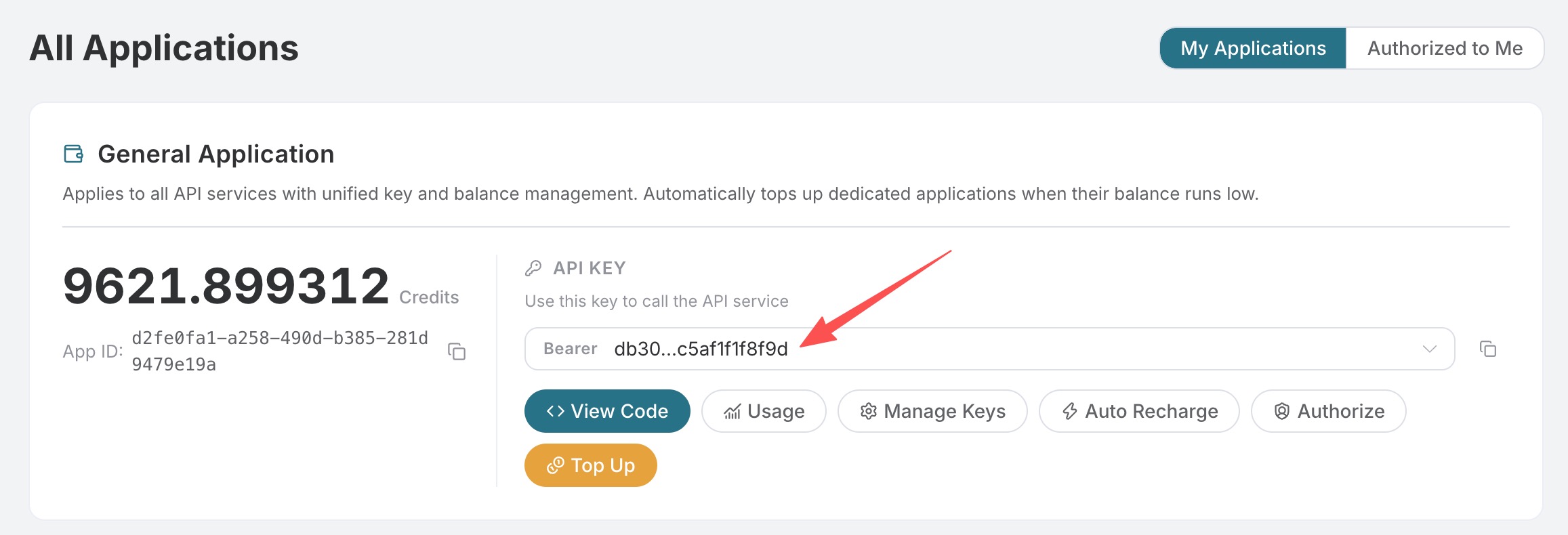
If you have not yet logged in or registered, you will be automatically redirected to the login page to register and log in, and will automatically return to the current page after completion.
One API Token can call all platform services; there is no need to apply separately for each service. Your first application will include free credits for a free trial; when credits are insufficient, you can top up your general balance in the Console.
📘 Full documentation: Maestro Video Generation API →
¶ Basic Usage
POST https://api.worldai.chat/maestro/videos
The most basic usage only requires passing in a natural language prompt; the AI director will automatically decide the script, visuals, voice-over, and editing. Here, we will first learn about the request headers and request body that need to be configured.
Request Headers include:
accept: The format in which you want to receive the response result. Enterapplication/jsonhere, which is JSON format.authorization: The key for calling the API. After applying, you can directly select it from the dropdown.content-type: The format of the request body. Enterapplication/jsonhere.
Request Body mainly includes:
prompt: Use natural language to describe the video to create (topic, what to display, style, audience).langs: The finished video language array. Only pass one language each time, such as["zh-cn"]; the default is["zh-cn"].aspect: The aspect ratio:9:16(default) /16:9/1:1.duration: The target duration (seconds), defaulting to 30.
All fields in the request body are shown in the table below:
| Field | Type | Required | Description |
|---|---|---|---|
prompt |
string | Yes | Use natural language to describe the video to create (topic, what to display, style, audience). The script, visuals, voice-over, and editing are all decided by AI |
action |
string | No | generate (default, generates a new video) / remix / edit / extend (iterates on an existing video; must be used together with ref_task_id) |
ref_task_id |
string | No | Required when action is remix / edit / extend: the historical task task_id used as the starting point |
file_urls |
string[] | No | Reference media (image / video / audio URLs), such as a product image or logo to appear on screen, or a source clip to which subtitles should be added |
langs |
string[] | No | Finished video language; only one language can be passed each time, such as ["zh-cn"]; the default is ["zh-cn"] |
aspect |
string | No | 9:16 (default) / 16:9 / 1:1, with unified output at 1080p/30fps |
duration |
int | No | Target duration (seconds), defaulting to 30, supports 5–300 seconds. Billing is based on the actual finished video duration, but will not exceed the requested duration |
scenario |
string | No | Video type: auto / narrated / captions / avatar / drama. captions requires a source video, and avatar requires a portrait |
style |
string | No | Visual style preset: auto (default) / cinematic / glass / luxury / swiss / modern / editorial / warm / vibrant / neon / mono / pastel / bold / industrial / futuristic / retro; free text is also accepted as a soft prompt. It is orthogonal to scenario and does not change routing |
voice |
string | No | Narration voice (language-independent, universal across languages): auto (default) / warm-female / bright-female / anchor-female / clean-female / calm-male / deep-male / documentary-male / energetic-male / storyteller-male; also supports a 32-character hexadecimal voice reference_id; other free text is not a valid voice ID |
Below, we demonstrate with a specific example. Suppose we want to generate a Chinese, vertical, 20-second educational short video. The corresponding CURL code is as follows:
curl -X POST 'https://api.worldai.chat/maestro/videos' \
-H 'accept: application/json' \
-H 'authorization: Bearer {token}' \
-H 'content-type: application/json' \
-d '{
  "prompt": "用 20 秒讲清楚什么是向量数据库,适合零基础观众,结尾给一句记忆点",
  "langs": ["zh-cn"],
  "aspect": "9:16",
  "duration": 20
}'
The corresponding Python code is as follows:
import requests

url = "https://api.worldai.chat/maestro/videos"

headers = {
    "accept": "application/json",
    "authorization": "Bearer {token}",
    "content-type": "application/json"
}

payload = {
    "prompt": "用 20 秒讲清楚什么是向量数据库,适合零基础观众,结尾给一句记忆点",
    "langs": ["zh-cn"],
    "aspect": "9:16",
    "duration": 20
}

response = requests.post(url, json=payload, headers=headers)
print(response.text)
Click Run, and you can see that a result will be returned immediately, as follows:
{
  "success": true,
  "task_id": "f57e99c4f60f4373a15517742ce2357d",
  "trace_id": "70e1cb12-c619-4292-a416-90191205996b"
}
The returned result fields are introduced as follows:
success: Whether this task was submitted successfully.task_id: The ID of this video generation task. Use it later to poll the result via the Maestro Task Query API.trace_id: The trace ID of this request, which can be provided to technical support for troubleshooting if issues occur.
Since video production takes a relatively long time, the API immediately returns task_id here and will not wait for video rendering to complete. Next, you need to use task_id to poll for the result. See the “Retrieve Results” section for details.
¶ Specify Video Type and Style (scenario / style)
When scenario is not provided, it is automatically determined by AI (equivalent to auto); if you want to pin the video to a certain type, explicitly provide it. For example, to create a vertical short drama, you can specify the following:
scenario: Video type, set todramahere (a short drama with characters + dialogue).style: Visual style, set tocinematichere (cinematic quality).
The filled-in CURL example is as follows:
curl -X POST 'https://api.worldai.chat/maestro/videos' \
-H 'accept: application/json' \
-H 'authorization: Bearer {token}' \
-H 'content-type: application/json' \
-d '{
  "prompt": "两个合租室友因为一只猫闹翻又和好,三幕反转,结尾温暖",
  "scenario": "drama",
  "style": "cinematic",
  "aspect": "9:16",
  "duration": 40
}'
Common combinations:
- Narrated short video:
scenario: "narrated". - Automatic subtitles:
scenario: "captions", requiring the source video to be passed throughfile_urls. - Digital human / talking-head video:
scenario: "avatar", requiring a portrait image to be passed throughfile_urls. - Short drama:
scenario: "drama"(characters + dialogue). styleis a visual style preset (such asmodern/neon/luxury), which does not change the type and only affects the visual appearance.voiceis used to specify the narration voice (such aswarm-female/deep-male), which is language-independent and works across languages.
The returned result is the same as in “Basic Usage,” and task_id is also returned immediately.
¶ Final Video Language
One task delivers one final video in one language only. langs can contain only one language code, such as ["zh-cn"] or ["en"]; passing multiple languages will return 400. If you need videos in different languages, please create tasks separately. Language selection does not change the per-second price.
¶ Iterate on an Existing Video (remix / edit / extend)
Pass action and the ref_task_id of the previous task to make incremental modifications based on the original project (such as “change the title of Scene 2,” “change the voice-over,” or “make the overall tone darker”). Small changes are fast, while major changes will require regeneration:
curl -X POST 'https://api.worldai.chat/maestro/videos' \
-H 'accept: application/json' \
-H 'authorization: Bearer {token}' \
-H 'content-type: application/json' \
-d '{
  "action": "remix",
  "ref_task_id": "f57e99c4f60f4373a15517742ce2357d",
  "prompt": "把开场标题换成更有冲击力的一句,整体配色更暗一些"
}'
remix: Reinterpret based on the original video structure (retain the theme while adjusting the presentation).edit: Fine-tune specific parts (such as changing titles, voice-over, or color grading).extend: Extend content based on the original video.
The returned result likewise immediately provides a new task_id; use it to poll and retrieve the final video after iteration.
¶ Retrieve Results
Since video production takes a relatively long time, this API immediately returns task_id after submission. You need to use it to poll the result via the Maestro Task Query API:
curl -X POST 'https://api.worldai.chat/maestro/tasks' \
-H 'accept: application/json' \
-H 'authorization: Bearer {token}' \
-H 'content-type: application/json' \
-d '{
  "id": "f57e99c4f60f4373a15517742ce2357d"
}'
When the task is completed, it returns final video information (located in the variants array). status will go through pending → planning → producing → succeeded (or failed), and polling is free and does not consume credits. For the complete response format and historical list queries, please refer to the Maestro Task Query API Integration Guide.
¶ Billing
Billing is based on the actual duration of the delivered final video after the task succeeds; failed tasks are not charged. The billable duration is calculated in whole seconds and does not exceed the requested duration; if the final video duration cannot be read, it falls back to the requested duration. Submitting a task itself is not billed separately, and /maestro/tasks polling is free.
Credits = Actual billable seconds × 0.7
All scenarios, actions, and languages use the same pricing, with no scenario multiplier or language surcharge. Each task delivers one final video in one language only. Requested target durations support 5–300 seconds, with unified output at 1080p / 30fps.
| Actual Billable Duration | Credits |
|---|---|
| 30 seconds | 21 |
| 60 seconds | 42 |
| 120 seconds | 84 |
| 300 seconds | 210 |
/maestro/tasks polling |
Free |
¶ Error Handling
When calling the API, if an error occurs, the API returns the corresponding error code and message. For example:
400 invalid_request: Bad request, possibly due to a missingpromptor invalid parameters.401 invalid_token: Unauthorized, invalid or missing authorization token.403 forbidden: Forbidden, insufficient balance or access.429 too_many_requests: Too many requests, you have exceeded the rate limit.500 api_error: Internal server error, something went wrong on the server.
¶ Error Response Example
{
  "success": false,
  "error": {
    "code": "api_error",
    "message": "fetch failed"
  },
  "trace_id": "2cf86e86-22a4-46e1-ac2f-032c0f2a4e89"
}
¶ Conclusion
Through this document, you have learned how to use the Maestro Video Generation API: with just one natural-language prompt, you can automatically complete scriptwriting, asset selection, voice-over, background music, editing, subtitles, and final video rendering. It also supports specifying video type, style, voice, final video language, and iteration on existing videos. We hope this document helps you better integrate and use this API. If you have any questions, please feel free to contact our technical support team.
¶ Related APIs
- Maestro Task Query API Integration Guide: Use the
task_idreturned byPOST /maestro/videosto query task status and results, or retrieve the historical task list (polling is free).