

Fish Model Create API Integration Guide
This API is based on the Fish Audio official Model API and is used to create a clone voice model that can be reused long-term based on an audio sample. The endpoint is POST https://api.worldai.chat/fish/model.
When you only need to temporarily use a reference voice, there is no need to create a model. You can directly use the
referencesparameter of the Fish TTS API for one-time instant cloning. For paginated retrieval of existing voices, please refer to the Fish Model Query API; to query the details of a single voice by_id, please refer to the Fish Model Get API.
¶ Application Process
To use the Fish Model API, first go to the WorldAi Console to obtain your API Token and keep it for later use.
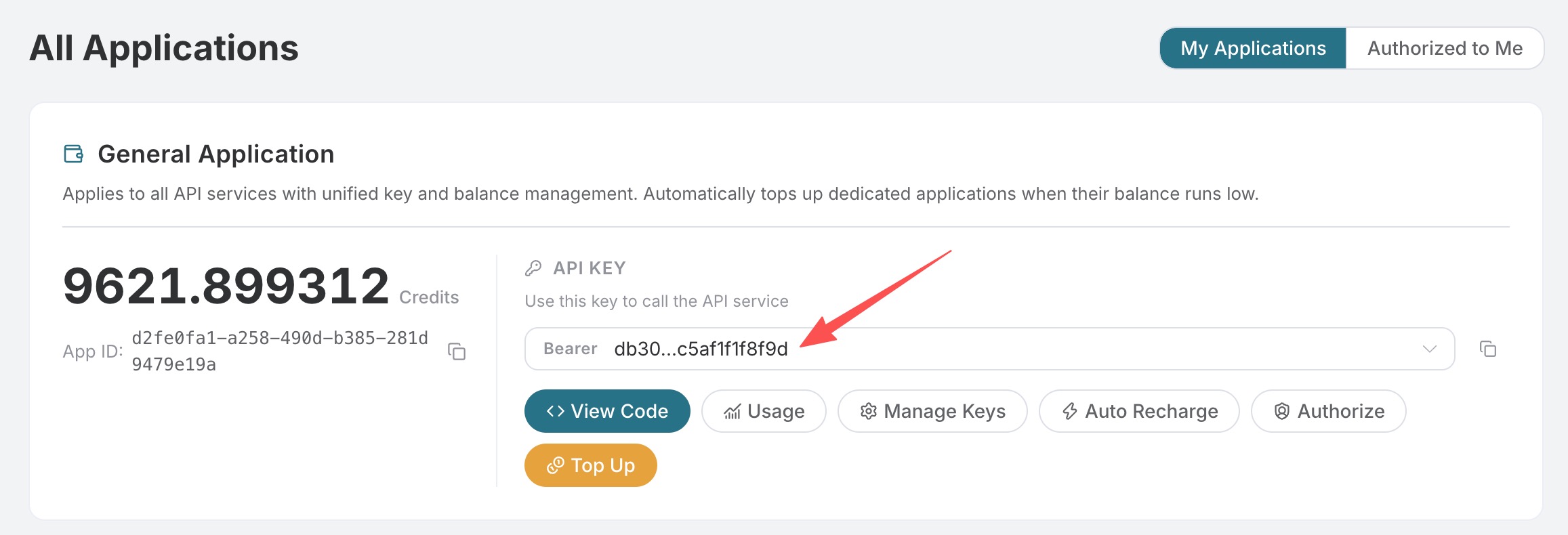
If you have not logged in or registered yet, you will be automatically redirected to the login page to register and log in. After completion, you will automatically return to the current page.
One API Token can call all platform services; there is no need to apply separately for each service. Your first application includes free credits for a free trial; when credits are insufficient, you can top up your general balance in the Console.
📘 Full documentation: Fish Model API →
¶ Request Body Fields
| Field | Type | Required | Description |
|---|---|---|---|
title |
string | Yes | Voice name, used for identification in the console list. |
voices |
string | Yes | HTTP(S) URL of the audio sample (a single string, not an array). This API does not support multipart/binary uploads; please upload the audio to any publicly accessible object storage first. |
description |
string | No | Voice description. |
cover_image |
string | No | HTTP(S) URL of the cover image. |
tags |
string[] | No | Public library search tags, for example ["male","narration","zh"]. |
texts |
string[] | No | Reference text corresponding to the sample (used to correct pronunciation). |
enhance_audio_quality |
boolean | No | Whether to enhance the audio quality of the sample before training. |
generate_sample |
boolean | No | Whether to automatically generate a sample audio clip after training is completed. |
For more information about voice models, please refer to the Fish official documentation.
Created voices will be publicly stored long-term, and other users may search for and use them. There is no need to pass
visibility; even ifprivateorunlistis passed, the current API will not change the public scope accordingly.
¶ Example: Create a Public Clone Voice
curl -X POST 'https://api.worldai.chat/fish/model' \
  -H 'authorization: Bearer {token}' \
  -H 'content-type: application/json' \
  -d '{
    "title": "我的克隆音色",
    "description": "用一段播客录音克隆的中文音色",
    "voices": "https://example.com/sample-voice.mp3",
    "cover_image": "https://cdn.acedata.cloud/e724d7f13d.png"
  }'
Note:
voicesmust be a string (a single audio URL), not an array. The upstream service will reject["..."]. It is recommended to use a publicly downloadable direct link with an.mp3or.wavextension.
A successful response directly returns the ModelEntity object from the Fish platform (the example below is the minimum usable voice that we have tested; some long fields have been removed for readability):
{
  "_id": "e5c6db52c3ed417f9cb2e5a33fb04667",
  "type": "tts",
  "title": "copilot-smoke-test",
  "description": "smoke test from api.acedata.cloud",
  "cover_image": "coverimage/e5c6db52c3ed417f9cb2e5a33fb04667",
  "train_mode": "fast",
  "state": "trained",
  "tags": [],
  "samples": [
    {
      "title": "Default Sample",
      "text": "师父,[语气坚定]我真的受够了这山上的清冷日子!...",
      "task_id": "6a1bf398dfae49dca0e23159214342a0",
      "audio": "https://platform.r2.fish.audio/task/6a1bf398dfae49dca0e23159214342a0.mp3"
    }
  ],
  "created_at": "2026-05-10T03:52:55.601000Z",
  "updated_at": "2026-05-10T03:52:55.601000Z",
  "languages": ["zh"],
  "visibility": "public",
  "default_text": "师父,[语气坚定]我真的受够了这山上的清冷日子!...",
  "like_count": 0,
  "mark_count": 0,
  "shared_count": 0,
  "task_count": 0,
  "author": {
    "_id": "780f2b2f862d41a08c0507bbbda77eb6",
    "nickname": "Penny Conrad",
    "avatar": "avatars/780f2b2f862d41a08c0507bbbda77eb6.jpg"
  }
}
_id can be used as the value of the reference_id field in the subsequent Fish TTS API, for speech synthesis using this clone voice:
Successfully created voices will be publicly stored. You can use self=true in the Fish Model Query API to query voices created by the current calling user through this platform. self=true only filters the list and does not restrict other users from using the voice.
curl -X POST 'https://api.worldai.chat/fish/tts' \
  -H 'authorization: Bearer {token}' \
  -H 'content-type: application/json' \
  -d '{
    "text": "你好,这是一段使用我刚创建的克隆音色合成的语音。",
    "reference_id": "e5c6db52c3ed417f9cb2e5a33fb04667",
    "format": "mp3"
  }'
¶ Sample Requirements
Empirical recommendations (consistent with the upstream service; please refer to the Fish official documentation):
- A duration of over 30 seconds is recommended, with the best results within 5 minutes; the marginal benefit beyond 10 minutes is limited.
- A sample rate of 16 kHz or above; both mono and stereo are supported.
- Keep the content as clean as possible: no background music, echo, or obvious ambient noise; use the same speaker.
- Recommended formats:
mp3/wav.
If you are unsure about the sample quality, you can also pass enhance_audio_quality: true to have the upstream service enhance the audio quality first.
¶ Billing Instructions
Creating a voice cloning model (POST /fish/model) is free of charge; the voice query APIs (Fish Model Query, Fish Model Get) are also not billed. Charges are incurred only based on usage when subsequently calling Fish TTS to synthesize speech.
¶ Error Handling
400 token_mismatched: Request parameters are missing or invalid (most commonly,voicesis not a URL, or it is passed as an array).400: When the reference audio cannot be downloaded, is too short, or its format cannot be recognized, please check the audio URL and file format.401 invalid_token: The authentication token does not exist or is invalid.429 too_many_requests: The account rate limit has been triggered.500 api_error: Internal server error.
Example error response:
{
  "success": false,
  "error": {
    "code": "api_error",
    "message": "voices is required and must be an HTTP(S) URL pointing to an audio file"
  },
  "trace_id": "2cf86e86-22a4-46e1-ac2f-032c0f2a4e89"
}
¶ Conclusion
To call this API, you only need to prepare a publicly accessible sample audio URL and place it in the voices field to obtain an _id, then feed it into the reference_id of /fish/tts to complete the end-to-end “cloning → synthesis” process. A common pitfall is that voices must be a string and cannot be an array.
¶ Create and Reuse Voices Through MCP
Call
fish_create_model(title="My Voice", voices="https://example.com/authorized-voice.wav")
in Fish MCP. voices is a single HTTP(S) audio URL; you can also pass description, cover_image, tags,
texts, enhance_audio_quality, and generate_sample.
This tool permanently saves public voices, which other users may discover and use; please use only
audio materials that you are authorized to process and publish. The tool has no private or unpublished option. The _id returned after successful creation is used for
the reference_id of fish_generate_audio, and fish_list_models(self=true) can be used to query voices
saved by yourself. When you only need a one-time reference voice, use references in fish_generate_audio
without creating a permanent voice.